- An ISO Certified Company
Home Automation: Complete Beginner-to-Advanced Guide
Home automation has evolved from a luxury feature to an essential part of modern living. With smart devices becoming affordable and widely accessible, homeowners can now automate lighting, security, entertainment systems, and daily routines with ease. This guide offers a complete overview of home automation, covering how it works, the benefits, key components, setup tips, and future trends.
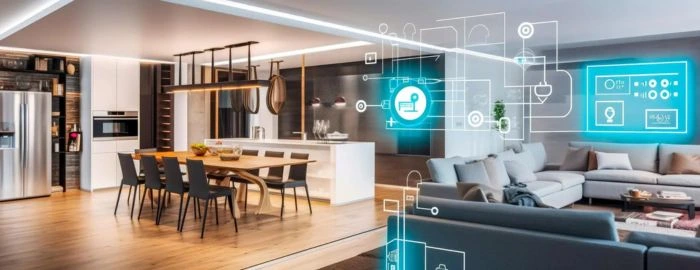
What Is Home Automation?
Home automation refers to the use of smart devices, systems, and technologies that allow homeowners to monitor and control home functions automatically or remotely. These systems use sensors, wireless networks, and intelligent software to manage everything from lighting and temperature to security and energy use.
Home automation aims to create a more convenient, efficient, and secure living environment by allowing devices to communicate with each other and perform tasks without manual intervention.
How Home Automation Works
Home automation works by connecting various smart devices throughout your home to a unified system that communicates and responds automatically. Home automation systems operate through three core components:
1. Smart Devices
These include lights, cameras, switches, thermostats, speakers, and appliances. Each device connects to Wi-Fi, Bluetooth, Zigbee, or Z-Wave networks.
2. A Central Hub or Controller
A smart hub acts as the brain of the system. It integrates various devices and allows centralized control through mobile apps or voice assistants.
3. Automation Software
The home automation software enables:
- Scheduling
- Remote access
- Real-time monitoring
- Scene creation
- Integration with sensors
For example, a simple automation rule could be: “Turn on porch lights at sunset.”
Benefits of Home Automation
Home automation offers greater convenience, enhanced security, and improved energy efficiency by allowing you to control and automate lighting, climate, appliances, and security systems. It simplifies daily routines, saves power, and creates a more comfortable and connected living experience.
1. Convenience and Comfort
Home automation eliminates repetitive tasks, such as adjusting lights or setting the temperature manually. Scenes like “movie mode” or “bedtime mode” create a comfortable environment instantly.
2. Enhanced Security
Smart cameras, motion sensors, and automated door locks help protect the home. Notifications alert homeowners to unusual activity, even when they’re away.
3. Energy Efficiency
Automation helps reduce power consumption by controlling lighting, cooling, and heating systems intelligently.
4. Cost Savings
Automated lighting and energy-efficient controls help reduce electricity bills over time.
5. Better Accessibility
Voice-controlled devices and automation routines support elderly users and individuals with mobility challenges.
Popular Components of a Home Automation System
1. Smart Lighting
Smart bulbs and switches allow dimming, scheduling, and color changes. Lights can turn on automatically when someone enters a room or off when the home is empty.
2. Smart Security Systems
Security automation includes:
- Smart door locks
- CCTV and IP cameras
- Door sensors
- Video doorbells
- Intrusion alarms
These devices offer real-time monitoring and quick alerts.
3. Smart Climate Control
Smart thermostats and AC controllers regulate temperature, adapt to usage habits, and improve energy efficiency.
4. Smart Home Entertainment
Modern home entertainment includes:
- Smart TVs
- Home cinema systems
- Multi-room audio
- Voice-controlled speakers
Automation can create immersive viewing or listening experiences.
5. Smart Appliances
Examples include:
- Smart refrigerators
- Robotic vacuums
- Connected washing machines
- Smart ovens
These devices simplify household tasks and improve daily living.
6. Smart Sensors
Sensors improve automation accuracy:
- Motion sensors
- Smoke and carbon monoxide detectors
- Water leak sensors
- Temperature and humidity sensors
They help automate safety and comfort functions.
Types of Home Automation Systems
1. Wireless Systems
Ideal for homes without existing wiring. Easy installation, affordable, and compatible with most smart devices.
2. Wired Systems
Reliable and suitable for large villas or new constructions. Often used in high-end automation setups.
3. Hybrid Systems
Combine wired and wireless technologies for enhanced flexibility.
How to Get Started With Home Automation
1. Identify Your Needs
Start with questions like:
- Do you want better security?
- Do you want energy savings?
- Do you prefer comfort or entertainment features?
2. Start Small
Begin with basic setups:
- Smart lighting
- Video doorbell
- Smart thermostat
- CCTV system
These provide immediate value.
3. Choose a Control System
Options include:
- Google Home
- Amazon Alexa
- Apple HomeKit
- Dedicated automation hubs
Select one based on compatibility with your devices.
4. Plan for Expansion
Home automation works best when devices communicate. Choose brands and systems that support integrations.
5. Ensure Strong Network Connectivity
A stable Wi-Fi network is essential for smooth automation. Consider installing mesh Wi-Fi or extenders for large homes.
6. Keep Security in Mind
Use strong passwords and update device firmware regularly to protect your smart home ecosystem.
Advanced Home Automation Ideas
1. Fully Automated Lighting Scenes
Lights adjust automatically based on:
- Time of day
- Motion
- Ambient light levels
2. Smart Garden & Irrigation
Soil sensors water plants automatically when moisture levels drop.
3. Automated Home Cinema Experience
Curtains, lights, speakers, and projectors adjust together for a seamless movie setup.
4. Geo-Fencing Automation
Lights, AC, and locks activate when a homeowner enters or leaves a specific radius.
5. Energy Monitoring Systems
Track consumption in real-time and optimize usage.
Common Challenges in Home Automation
1. Device Compatibility Issues
Not all devices work with all hubs. Compatibility research is essential.
2. Connectivity Problems
Weak Wi-Fi may interrupt automation routines.
3. Security Risks
Unsecured devices can be vulnerable to hacking.
4. Technical Complexity
Advanced setups may require professional installation.
Home Automation Costs
Home automation costs vary depending on the type of devices, system complexity, and the size of the home. A basic setup may start with a few smart lights, while a complete smart home ecosystem can involve security, entertainment, climate control, sensors, and advanced automation hubs.
1. Basic Home Automation Setup Costs
Ideal for beginners:
- Smart bulbs
- Smart plugs
- Basic hub or app control
Estimated cost: AED 300 – AED 1,500 (or equivalent)
2. Intermediate Smart Home Setup Costs
Offers more control and additional features:
- Smart lighting system
- Smart thermostat
- Video doorbell
- Smart CCTV cameras
- Smart speakers
Estimated cost: AED 2,000 – AED 7,500
3. Advanced Full Home Automation Setup Costs
Suitable for villas, large flats, or full integrations:
- Central automation controller
- Smart switches
- Multi-room audio
- Smart curtains
- Home cinema integration
- Advanced security systems
- Sensors
Estimated cost: AED 10,000 – AED 50,000+
4. Factors That Influence Home Automation Costs
- Type of devices
- Brand quality
- Wired vs. wireless systems
- Number of rooms
- Integration requirements
- Professional installation fees
5. Long-Term Savings
Home automation reduces electricity usage through:
- Smart climate control
- Automated lighting
- Energy monitoring systems
- Occupancy-based scheduling
These savings help offset the initial investment over time.
Home Automation Installation Guide
Installing home automation can be simple or complex depending on your setup. This step-by-step guide helps beginners understand the process clearly.
1. Plan Your Needs
Start by identifying:
- Which rooms need automation
- The purpose (lighting, energy savings, security, entertainment)
- Preferred smart ecosystem (Google, Alexa, Apple, Zigbee, Z-Wave)
A clear plan ensures compatibility and helps avoid unnecessary purchases.
2. Check Your Home’s Network Strength
Home automation depends heavily on a stable Wi-Fi network.
To prepare:
- Ensure strong Wi-Fi coverage
- Consider using mesh Wi-Fi for large homes
- Use a dual-band router (2.4 GHz for smart devices)
3. Choose Your Smart Hub or Integration Method
Options include:
- Google Home
- Amazon Alexa
- Apple HomeKit
- Dedicated automation hubs (optional)
Select a hub that supports the devices you plan to install.
4. Start With Easy, High-Impact Devices
Begin with simple automation devices such as:
- Smart lights
- Smart plugs
- Smart door locks
- Video doorbells
- Cameras
These devices offer immediate improvements and are easy to install.
5. Install and Configure Your Devices
Typical steps:
- Mount or plug in the device
- Connect it to Wi-Fi or Zigbee/Z-Wave hub
- Pair it using the mobile app
- Customize settings (scenes, schedules, brightness, routines)
Follow manufacturer instructions for accurate setup.
6. Create Automation Routines
Examples:
- “Good Morning” scene: lights turn on gradually
- “Away Mode”: lights off, doors locked, cameras active
- “Movie Mode”: dim lights, start AV equipment
- “Bedtime Routine”: switch off appliances automatically
These routines enhance comfort and efficiency.
7. Expand Your System Gradually
Once comfortable, add:
- Smart curtains
- Smart thermostats
- Water leak sensors
- Multi-room audio
- Full home security integrations
Gradual expansion ensures smooth operation and compatibility.
8. Test and Optimize Your Setup
Run automation routines for a few days and refine:
- Sensitivity of motion sensors
- Schedule timings
- Device placement
- Network strength
Optimization improves system reliability.
9. Maintain and Update Regularly
- Update device firmware
- Replace old batteries in sensors
- Monitor app notifications
- Review routines every few months
Regular maintenance keeps your smart home running smoothly.
Future Trends in Home Automation
1. AI-Powered Automation
Systems will learn from user behavior to automate routines more accurately.
2. Matter Protocol
A universal standard enabling all brands to work together seamlessly.
3. Smart Energy Homes
Integration of solar systems, smart meters, and automated power distribution.
4. Voice-First Homes
Voice commands will become the primary method of control.
5. Predictive Maintenance
Smart devices will detect issues and notify homeowners before failures occur.
Conclusion
Home automation continues to redefine modern living by offering convenience, safety, energy savings, and a personalized lifestyle experience. With the advancement of smart devices, AI, and connected ecosystems, the possibilities for home automation are expanding rapidly. Whether starting with basic smart lights or planning an entire smart home ecosystem, automation adds comfort and intelligence to everyday life.
Our Solutions
Your Questions Answered
Explore our frequently asked questions to find answers to common queries about our Home Automation: Complete Beginner-to-Advanced Guide in Dubai. If you can't find what you're looking for, feel free to contact us for further assistance.

Latest Project



Enquiry
 Business Info
- Saheel Tower - 2 - Office 405 - Al Nahda First - Dubai - United Arab Emirates
- + 971 566 866 853
- info@zyonz.com
 www.zyonz.ae